New: AI-Powered PDF Splitting

Transform Images into Data with Img2sheet

Save 10+ hours per week. Upload your receipts, invoices, and forms — watch them instantly appear as structured data in Google Sheets.

Start with 50 free credits — no credit card required
Be up and running in 2 minutes — no technical setup needed
Eliminate 95%+ of data entry errors with AI precision

Get 50 free credits instantly • No credit card needed

Scroll
Process

Extract Data in 3 Simple Steps

Our streamlined process makes it easy to go from document to structured data in no time.

Features

Save Hours Every Week on Data Entry

Transform tedious manual work into automated workflows that save time, reduce errors, and let you focus on what matters.

AI-Powered Extraction

Turn receipts, invoices, and forms into structured data in seconds with 95%+ accuracy. No more manual typing or data entry errors.

Eliminate Manual Work

Free up your team to focus on strategic work instead of data entry. Reclaim 10-15 hours per month previously spent on tedious manual tasks.

Real-time (Instant) Sync

See your data appear in Google Sheets instantly. Access up-to-date information from anywhere, anytime — perfect for teams on the go.

Batch Processing

Save 3+ hours per week by processing hundreds of documents at once. Handle your monthly receipts in minutes, not hours.

No Training Required

Start extracting data in under 2 minutes. Anyone on your team can use it immediately — zero learning curve, zero training costs.

Google Drive Integration

Work where your files already live. Extract data directly from Google Drive — no downloading, no uploading, no wasted time.

Webhook Integration

Connect to your existing tools in minutes. Automate your entire workflow — from document upload to CRM update — without writing code.

In-App PDF Splitting

Handle complex PDFs with ease. Split and extract multi-page documents without juggling multiple tools — everything in one place.

100% Safe

Sleep soundly knowing your sensitive documents are never stored. Enterprise-grade security protects your data — processed and deleted instantly.

Requirements

Supported Image Formats & Quality Guidelines

To ensure the best extraction results, please follow these image requirements

Supported Formats

  • JPEG/JPG
  • PNG
  • WebP
  • Maximum file size: 5MB

Quality Requirements

  • Minimum resolution: 300 DPI
  • Clear, non-pixelated text
  • Good contrast
  • No blur or distortion

Best Practices

  • Proper lighting
  • Flat, unwrinkled documents
  • No shadows or glare
  • Full document visible
Testimonials

Loved by Businesses Worldwide

See what our users have to say about Img2sheet

"Img2sheet has completely transformed how we handle expenses. What used to take hours now takes minutes. The accuracy is incredible!"

JD
John Doe
Finance Manager

"The Google Sheets integration is seamless. I love that I can just upload a photo and see the data appear in my spreadsheet instantly."

JS
Jane Smith
Small Business Owner

"We process hundreds of invoices a month. Img2sheet handles the volume effortlessly and the batch processing feature is a lifesaver."

MR
Mike Ross
Operations Director
Plans

Choose Your Perfect Plan

Select the plan that best fits your needs

1 Credit = 1 Document Extraction | Credits are expirable

Basic

$9.99 / month
200
Credits
200 document extractions
Get started with simple, reliable conversions
Most Popular

Pro

$24.99 / month
1,000
Credits
1,000 document extractions
Weekly workflows made easy

Business

$29.99 / month
2,000
Credits
2,000 document extractions
Best value for everyday power users

Agency

$59.99 / month
5,000
Credits
5,000 document extractions
Scalable processing for teams and clients

Enterprise

$99.99 / month
12,000
Credits
12,000 document extractions
Custom scale, control, and support

Start with 50 Free Extractions

Try our service risk-free with 50 free document extractions

Get Started

100% Secure

Your data is encrypted and never stored

Cancel Anytime

No long-term commitments required

Tutorials

Learn How to Use Img2Sheet

Watch our step-by-step video guides to get started quickly and master all features

[1/6] Log in to Img2Sheet (Website) — Start Instantly with Google

Sign in to Img2Sheet instantly with your Google account — no registration needed. Your account is created automatically, and you can start converting images or PDFs into structured Google Sheets data right away.

Watch Tutorial

[2/6] Log in to Img2Sheet (Google Sheets Extension)

Learn how to access Img2Sheet directly inside Google Sheets through the official extension. Just log in with Google and start transforming your images and PDFs into structured spreadsheet data using AI — right where you work.

Watch Tutorial

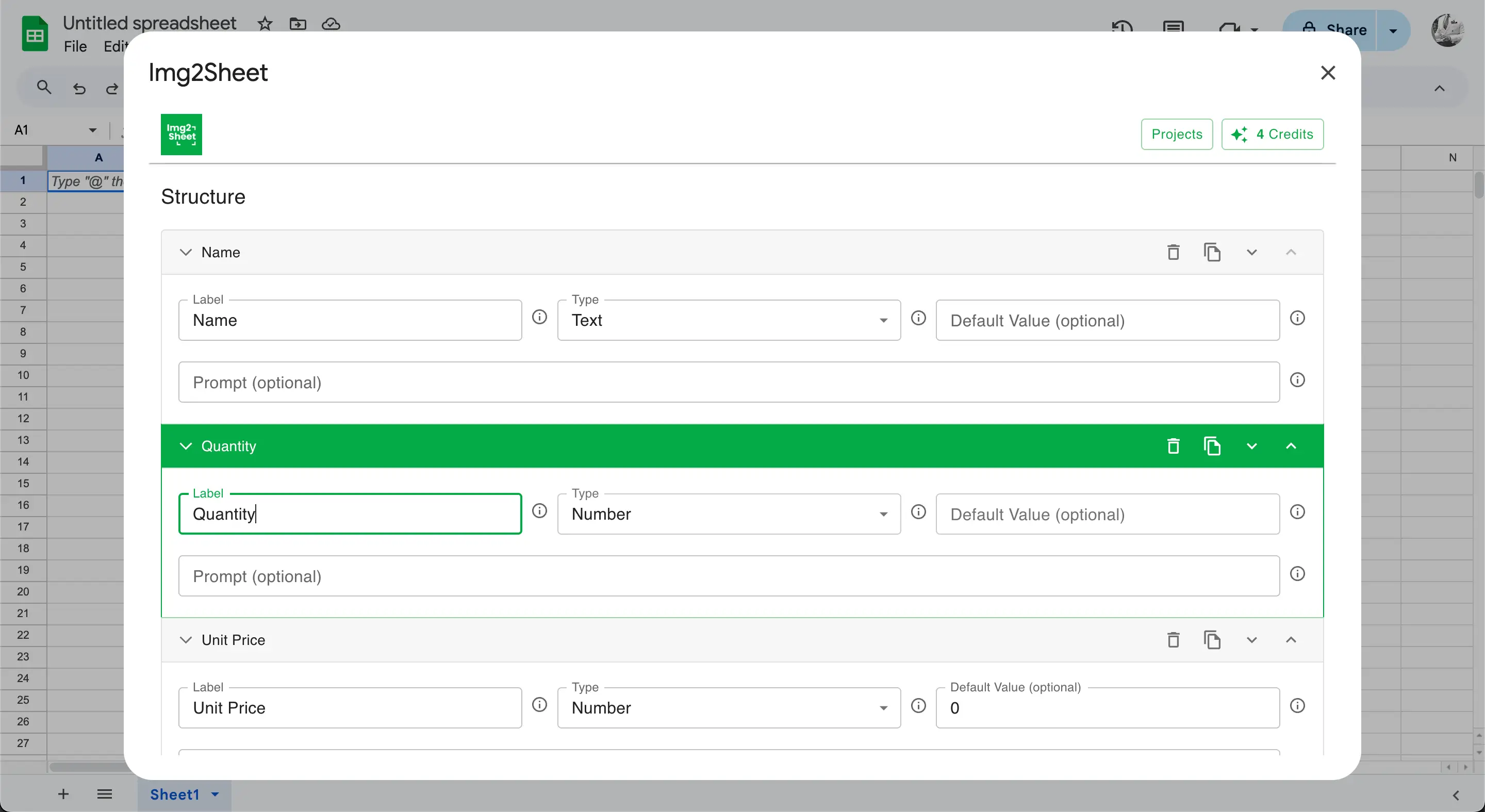
[3/6] Create a Project in Img2Sheet — Define Columns and Data Types

Organize your data extractions by creating a project in Img2Sheet. Each project lets you define columns with specific data types (text, number, etc.) — so AI extraction fits perfectly into your preferred structure.

Watch Tutorial

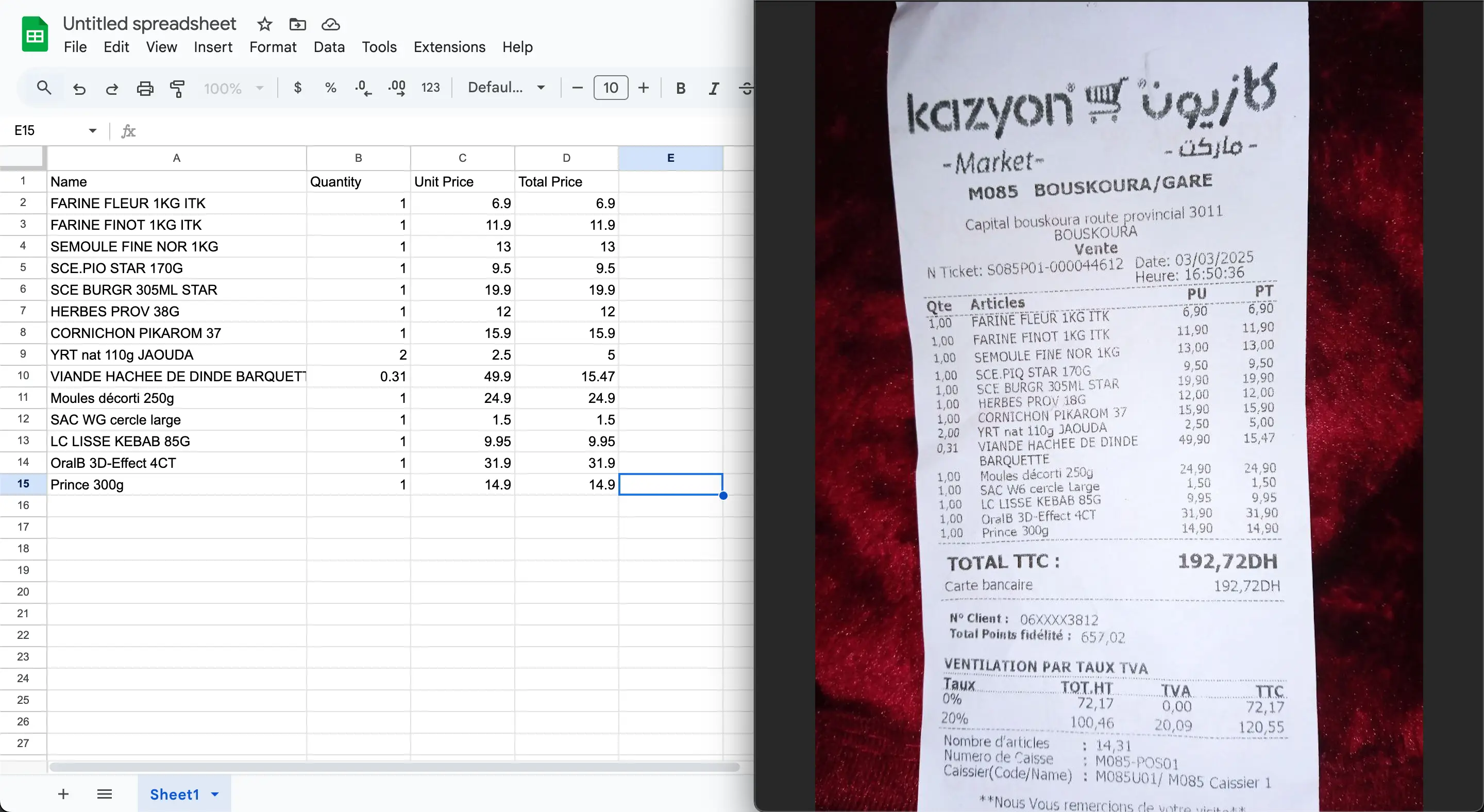
[4/6] Extract Data with AI (Google Sheets Extension)

Use Img2Sheet's AI inside Google Sheets to extract data from images and PDFs in seconds. Simply upload your file, and the AI automatically fills your sheet with clean, structured data.

Watch Tutorial

[5/6] Extract Data with AI (Website Version)

See how to extract data from images and PDFs directly on the Img2Sheet website. Before starting extraction, configure which Google Sheet file and tab you want the AI-generated data to be inserted into — then upload your file and watch Img2Sheet instantly fill your sheet with structured data.

Watch Tutorial

[6/6] Upload from Google Drive — Extract Data Automatically with AI

Learn how to import files from Google Drive into Img2Sheet, whether you're using the website or the Google Sheets extension. Simply connect your Drive account, choose your file, and specify the Google Sheet file and tab where you want the AI-extracted data to appear. Img2Sheet automatically converts your PDFs or images into structured data — directly inside your sheet.

Watch Tutorial
Support

Frequently Asked Questions

Find answers to common questions about Img2sheet's capabilities and features.

What types of documents can Img2sheet process?

Img2sheet can handle a wide variety of document types, including:

  • Invoices and receipts
  • Forms and applications
  • Business cards
  • Tables and spreadsheets
  • Handwritten documents
How accurate is the data extraction?

Our AI-powered extraction boasts high accuracy rates, typically above 95%. However, accuracy can vary depending on the quality of the input image and the complexity of the document structure.

Is my data secure?

Yes, we take security seriously. Your documents are processed in real-time and immediately deleted from our servers. We use enterprise-grade encryption and never store sensitive information.

Can I customize the extraction fields?

Absolutely! You can create custom templates to specify exactly which data fields you want to extract and where they should go in your Google Sheets.

Do you offer batch processing?

Yes, you can upload multiple documents at once. Our system processes them sequentially to ensure accuracy and reliability, updating your Google Sheets as each document is completed.

Do I need technical skills to use Img2Sheet?

No. Anyone can start in under 2 minutes.

Blog

Latest Insights & Guides

Stay updated with the latest tips, tutorials, and best practices for data extraction

Start Automating Today

Ready to Transform Your Workflow?

Join thousands of businesses already using Img2sheet to automate their data extraction